


Lollipop - Smart baby monitor
2.3316.00 Reviews
App Specs
- Version
- Varies with Device
- Updated On
- License
- Free
- Downloads
- 100,000+
- Developer
- Masterwork Aoitek Co., Ltd.,
- Categories
- Parenting
- Platform
- Android
Screenshots
 Analysis by AppCompare
When I first heard about the Lollipop - Smart baby monitor, I was intrigued. As someone who loves to dabble with smart home gadgets, the idea of a baby monitor that promises to be more than just a camera was pretty appealing. So, naturally, I had to check it out. Here's what I discovered after giving it a go.
First Impressions: Design and Setup
Right out of the box, the monitor is a stunner. It's designed to look cute, almost like a toy, which is perfect for a baby's room. The monitor comes in several colors, so you can pick the one that best matches your nursery decor. The flexible, silicone design is super handy. You can wrap it around crib bars, stand it on a flat surface, or mount it on the wall. Talk about versatile!
Setting it up was a breeze. All you need is the Lollipop app, available for both Android and iOS. Once you download it, the app guides you through the setup process step by step. It took me less than ten minutes to get everything up and running. No complicated wiring or advanced tech skills required. Just a Wi-Fi connection and a smartphone, and you're good to go.
Where setup and daily use can snag
A quick setup does not guarantee that every part of the system will behave perfectly every time. The camera, phone, home Wi-Fi and app all need to work together, so it helps to think of the monitor as a connected system rather than a standalone screen. If the picture stalls or an alert arrives late, I would first check whether the phone and camera still have a dependable connection before assuming the monitor itself has failed.
Room layout matters too. A flexible mount gives you options, but the view still depends on where you place it and what the camera can see. Before settling on a position, I would check the crib view from the app, then make sure the camera remains secure and the intended area is visible. A neat-looking location is not useful if the mattress edge or the part of the room you care about is out of frame.
It is also worth deciding how you want to use alerts before bedtime. A crying alert can be useful when you are in another room, but notifications are only helpful if the phone is reachable and set up to receive them. I would keep the app’s alert behavior in mind during a normal daytime test rather than discovering a phone setting or connection issue in the middle of the night.
Features That Stand Out
Now, let's talk about what makes this monitor smart. First up, the video quality. The monitor offers 720p HD video, which is clear enough to see what's going on in your little one's room. It also has night vision, so even when the lights are out, you don't miss a thing.
Worth Reading Before You Choose

Flipboard Shows What News Apps Must Do Beyond the Feed

Switching to Android Auto Means Rethinking Your Driving Routine

Google Calendar Makes a Crowded Week Easier to Manage

Ludo King Makes the Most of the Minutes Between Plans

Baby Panda World Brings Quick Play to Modern Phones, but Its Game Library Feels Busy

ESPN’s Live Game View Makes Following Close Games Easier
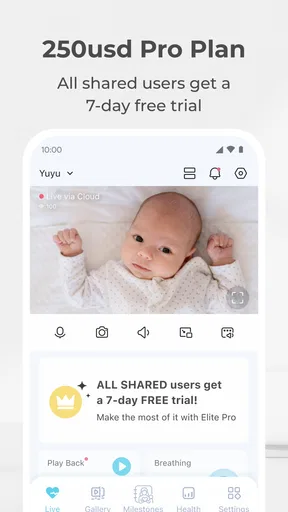
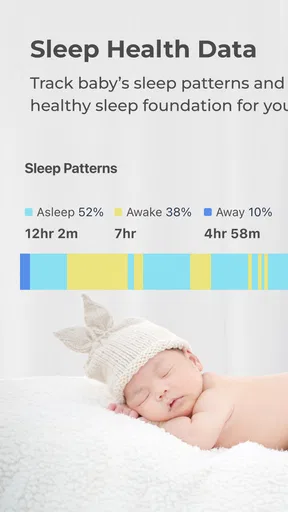
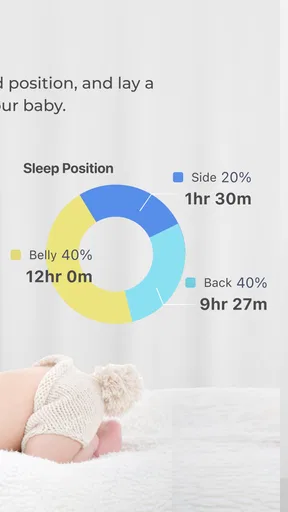
The real magic, though, is in the app features. With the app, you can monitor your baby in real time and track sleep patterns. There's built-in noise detection that sends alerts straight to your phone when your baby starts crying. It’s pretty impressive how it distinguishes between crying and other noises. The app also offers a crossing-line feature, which alerts you if your baby strays out of a designated area. Handy for those with toddlers!
One of the coolest features is the ability to play soothing sounds and lullabies. You can control these directly from your phone, so if your baby wakes up in the middle of the night, you can help them drift back to sleep without entering the room. Plus, the two-way audio means you can speak to your little one, offering comfort from afar.
A routine that makes the features more useful
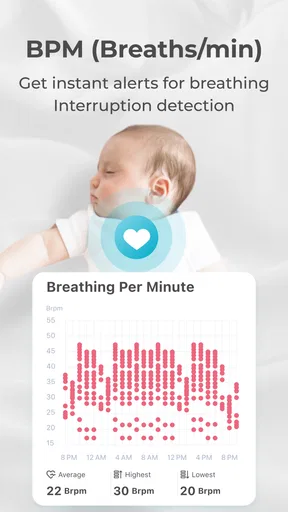
I would treat sleep tracking as a way to notice patterns, not as a replacement for watching the baby or making parenting decisions. The most practical use is to compare the app’s record with what you already observe: when a nap tends to start, how often the baby wakes, or whether a change in the evening routine seems to affect settling. That context makes the information more useful than checking numbers in isolation.
The crossing-line alert is most relevant once a child is moving around more. It can help draw attention to movement across a chosen boundary, but it should not be treated as a substitute for childproofing or direct supervision. I would set the line around an area that makes sense in the camera view, then check that ordinary movement does not trigger alerts constantly. If the boundary is awkwardly placed, the feature may become noise rather than help.
For soothing sounds, a small workflow can prevent unnecessary disruption: try the sound at a calm time, learn where the controls are, and keep the volume appropriate for the room. Two-way audio can offer reassurance, but it is not the same as being physically present; a baby who needs feeding, changing or comfort may still need you to go in. These tools are most helpful for brief check-ins, not as a promise that every wake-up can be handled from the phone.
Performance and Reliability
In terms of performance, the monitor delivers. I found the connection to be stable, with minimal lag between the monitor and the app. The video quality holds up well, even when the internet is being used for other tasks. The app itself is intuitive and user-friendly, which is a huge plus for those who aren't tech-savvy.
Battery life isn't an issue here since the monitor plugs into the wall. However, the app does consume a fair bit of phone battery, so it's something to keep in mind if you're planning on having it open for extended periods.
Simple checks when the feed or alerts falter
If the live view stops responding, I would start with the basics: confirm that the monitor still has power, check that the phone has a working network connection, and reopen the app. If the problem continues, checking the home Wi-Fi connection and restarting the app or phone is a sensible next step. These checks do not fix every fault, but they help separate a temporary connection interruption from a more persistent setup issue.
When video works but notifications do not arrive, I would check the phone’s notification settings for the app and make sure the relevant alert option is enabled in the app. Then I would test again while awake and nearby. A quiet phone, muted notification setting or interrupted connection can make an alert seem unreliable even when the camera is still showing a picture.
If you change the camera’s position, revisit the view and any crossing-line area afterward. A small adjustment can shift the visible scene enough to make an old boundary less useful. I would also avoid relying on a single successful test: check the picture in daylight and in the dark, and try the audio controls before counting on them during a nighttime wake-up.
When the app may not be the problem
Not every poor view points to an app fault. A camera aimed toward a bright window, a partially blocked lens, or a room arrangement that hides the crib can affect what you see. Night vision also cannot show details that are outside the camera’s view. Before changing settings repeatedly, I would inspect the physical placement and lighting, then make one adjustment at a time so it is clear what helped.
Likewise, a delay can come from the connection between devices rather than the camera itself. If other household devices are also struggling online, checking the Wi-Fi connection is more useful than immediately reinstalling the app. If the issue affects only this monitor and continues after basic checks, then looking for app support or troubleshooting guidance is a more reasonable next step than assuming the problem is your phone.
There is a broader limitation worth keeping in mind: this is a phone-based monitor, so it fits best when you are comfortable using a smartphone as part of the monitoring routine. A dedicated parent unit can be more convenient for someone who wants a separate screen that stays ready, while a simple audio monitor may suit a household that does not need video or app features. The richer setup is not automatically the better one for every family.
Who is likely to get the most from it?
I can see this app working well for parents who already reach for their phone throughout the day and want a camera view, sound alerts and remote controls in one place. It is particularly appealing if you value being able to check in from another room, use two-way audio for a brief reassurance, or review sleep patterns alongside your own observations. Its flexible camera design can also help when a fixed mount would be awkward in the nursery.
Consider an ordinary evening: one parent is preparing dinner while the baby settles in the next room. A quick look at the live view can answer whether the child is asleep, and an alert can prompt a check if crying begins. If the baby wakes briefly, a soothing sound or a few words through two-way audio may help. If the baby remains upset, the parent can go in rather than treating the phone as a complete substitute for care. That is the balance I find most sensible.
I would be more cautious if you need a monitor that works independently of a smartphone, want the simplest possible audio-only setup, or are uncomfortable relying on home Wi-Fi for a live feed. Parents who want a dedicated screen may find a conventional video monitor easier to keep on at all times. And if you are shopping mainly for a basic camera without sleep and alert tools, a simpler option may be a better fit than paying attention to features you will not use.
How it fits among baby-monitor choices
Compared with a basic audio monitor, this approach gives you a visual check and app-based controls, but it also adds a phone and network to the routine. Compared with a conventional video monitor that uses a separate parent unit, it may feel more convenient if your phone is already close by, while a dedicated unit can be easier when you do not want to keep an app open or share your phone. The right comparison is not simply which has more features; it is which arrangement you will reliably use when tired.
For families choosing between this and a straightforward camera, the useful question is whether the extra tools match a real need. Crying alerts and sleep tracking can support a routine, while crossing-line alerts may matter more as a child becomes mobile. If those situations are relevant, the added app features have a purpose. If all you want is an occasional glance at the crib, a simpler monitor may be less distracting and easier to maintain.
Cost, access and expectations
The app is free to download, and the developer is Masterwork Aoitek Co., Ltd. It is listed in the parenting category, is rated for Everyone, and has been available since September 14, 2016. The app has over 100,000 installs, around 2,500 ratings and a 2.3 average rating. That low average is a reason to approach it with realistic expectations and test the parts you intend to rely on, rather than assuming every household will have the same experience.
Some in-app purchases are available, ranging from $0.99 to $249.99 per item. I would check what a particular purchase covers inside the app before paying, and decide whether it solves a need you actually have. The core question is not whether every feature is available, but whether the basic monitoring routine feels dependable and comfortable in your home.
Final Thoughts
After spending some time with the monitor, I can confidently say it's a solid choice for parents who want a bit more than just a basic video feed. The combination of a distinctive design, ease of use and smart features makes it stand out in the crowded market of baby monitors.
While it might not be the cheapest option out there, the added features and peace of mind it offers could be well worth the investment. Whether you're a tech enthusiast or a concerned parent looking to keep an eye on your child, it provides a monitoring option that can fit into a connected home routine.
In short, if you're in the market for a baby monitor that goes beyond the basics, give the Lollipop - Smart baby monitor a look. It just might be the right addition to your home setup, provided you are happy using a phone and Wi-Fi as part of the experience.
Pros
- Easy setup with intuitive interface.
- High-quality video streaming capability.
- Two-way audio for instant communication.
- Customizable alerts for movement or sound.
- Compatible with both Android and iOS.
Cons
- Requires stable internet connection.
- Limited free features; subscription needed.
- Battery drain on frequent use.
- Occasional app crashes reported.
- Privacy concerns with cloud storage.
FAQs for Lollipop - Smart baby monitor
How does Lollipop - Smart Baby Monitor ensure the safety and privacy of my data?
Lollipop - Smart Baby Monitor prioritizes your family's privacy by employing advanced encryption protocols to protect your data. All video and audio feeds are encrypted and stored securely. Additionally, the app requires user authentication to access the monitor, ensuring that only authorized users can view the live feed or recordings.
What features does Lollipop - Smart Baby Monitor offer for monitoring my baby?
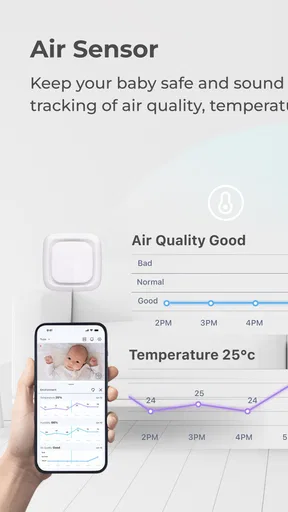
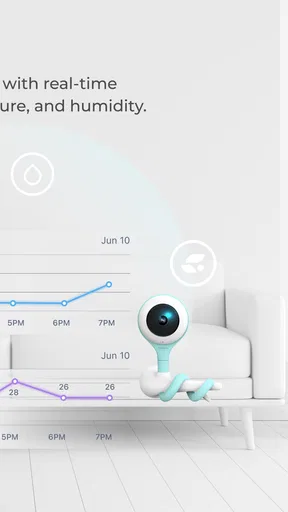
Lollipop offers a range of features to help you monitor your baby effectively, including real-time HD video streaming, two-way audio communication, and cry detection alerts. The app also provides temperature and humidity monitoring to ensure your baby's environment is comfortable. Additionally, it includes video playback and the ability to share access with family members.
Is Lollipop - Smart Baby Monitor compatible with both Android and iOS devices?
Yes, the Lollipop - Smart Baby Monitor is designed to work seamlessly with both Android and iOS devices. Users can download the app from Google Play or the App Store. The app supports a wide range of smartphones and tablets, ensuring flexibility and convenience for all users.
Can I access the Lollipop - Smart Baby Monitor from multiple devices?
Absolutely! The Lollipop - Smart Baby Monitor allows you to access the feed from multiple devices simultaneously. You can share access with family members or caregivers, enabling them to monitor the baby remotely. This feature is particularly useful for parents who want to ensure their baby's safety when they're away.
Does Lollipop - Smart Baby Monitor support remote viewing outside of my home network?
Yes, Lollipop - Smart Baby Monitor supports remote viewing, allowing you to check on your baby even when you're away from home. As long as you have an internet connection, you can access the live feed through the app. This feature provides peace of mind for parents who need to stay connected while on the go.


